import numpy as np
import pandas as pd
import matplotlib.pyplot as plt

from numcosmo_py import Nc, Ncm

# Initialize the library objects
Ncm.cfg_init()Simple Cosmological Distances Example
Introduction
This example demonstrates how to compute cosmological distances using the numcosmo library. In this example, we initialize the library, configure a cosmological model, and compute comoving distances for a range of redshifts.
Prerequisites
Before running this example, make sure the numcosmo_py1 package is installed in your environment. If it is not already installed, follow the installation instructions in the NumCosmo documentation. In addition, we are using numpy, matplotlib and pandas for data manipulation and plotting. If you are using the conda installation, these packages are already installed.
1 NumCosmo is a C library for cosmology and astrophysics that uses GObject-Introspection to provide bindings for various programming languages. To improve the user interface, we provide a Python package, numcosmo_py. This package imports all NumCosmo bindings and includes additional helper functions to simplify library usage.
Import and Initialize
First, import the required modules and initialize the NumCosmo library. We also import numpy, matplotlib and pandas. The Nc and Ncm modules provide the core functionality of the NumCosmo library. The call to Ncm.cfg_init() initializes the library objects.
Set Up the Cosmological Model
Create a homogeneous and isotropic cosmological model (NcHICosmoDEXcdm) with one massive neutrino, and apply a reparameterization suitable for CMB-based parameters.
# Initialize a cosmological model
cosmo = Nc.HICosmoDEXcdm(massnu_length=1)

# Set reparameterization
cosmo.set_reparam(Nc.HICosmoDEReparamCMB.new(cosmo.len()))
Configure the Distance Calculator
Create a Distance object optimized for redshift calculations up to 2.0.
# Initialize the distance calculator
dist = Nc.Distance.new(2.0)
Set Cosmological Parameters
Assign values to the cosmological model parameters. The dictionary-based approach is used below. This approach always uses the current parameterization.
# Set parameters using original parameterization
h = 0.70
cosmo["H0"] = 100.0 * h
cosmo["omegac"] = 0.25 * h**2
cosmo["omegab"] = 0.05 * h**2
cosmo["Omegak"] = 0.0
cosmo["Tgamma0"] = 2.72
cosmo["w"] = -1.10
cosmo["massnu_0"] = 0.06
Alternatively, you can use the property-based approach to set the parameters. However, this approach always refers to the original parameterization.
# Set parameters using object-oriented style
cosmo.props.H0 = 70.00
cosmo.props.Omegab = 0.04
cosmo.props.Omegac = 0.25
cosmo.props.Omegax = 0.70
cosmo.props.Tgamma0 = 2.72
cosmo.props.w = -1.10

# Set neutrino mass vector
massnu = Ncm.Vector.new_array([0.06])
cosmo.props.massnu = massnu
Log and Prepare the Model
Log the parameter values and prepare the distance calculator for use. The calculator objects like Distance must be prepared before use.
# Log all parameters
print("# Model parameters: ")
params = cosmo.param_names()

for param in params:
    print(f"{param} = {cosmo[param]}")

# Prepare the distance calculations
dist.prepare(cosmo)
# Model parameters:
H0 = 70.0
omegac = 0.12249999999999998
Omegak = 0.008608553079476389
Tgamma0 = 2.72
Yp = 0.24
ENnu = 3.046
omegab = 0.0196
w = -1.1
massnu_0 = 0.06
Tnu_0 = 0.71611
munu_0 = 0.0
gnu_0 = 1.0Compute and Display Distances
Calculate and display comoving distances for a range of redshifts.
# Number of redshift steps
N = 20

# Comoving distance scaling factor
RH_Mpc = cosmo.RH_Mpc()

# Compute distances
z_array = np.linspace(0.0, 1.0, N)
Dc_array = np.array([dist.comoving(cosmo, z) for z in z_array])
dc_array = RH_Mpc * Dc_array / (1.0 + z_array)

# Putting everything in a pandas DataFrame

pd.DataFrame(
    {
        "Redshift": z_array,
        "Comoving Distance [c/H0]": Dc_array,
        "Comoving Distance [Mpc]": dc_array,
    }
)| Redshift | Comoving Distance [c/H0] | Comoving Distance [Mpc] | |
|---|---|---|---|
| 0 | 0.000000 | 0.000000 | 0.000000 |
| 1 | 0.052632 | 0.052144 | 212.153565 |
| 2 | 0.105263 | 0.103255 | 400.100017 |
| 3 | 0.157895 | 0.153259 | 566.863471 |
| 4 | 0.210526 | 0.202095 | 714.995760 |
| 5 | 0.263158 | 0.249718 | 846.672769 |
| 6 | 0.315789 | 0.296098 | 963.766547 |
| 7 | 0.368421 | 0.341215 | 1067.900012 |
| 8 | 0.421053 | 0.385060 | 1160.489042 |
| 9 | 0.473684 | 0.427636 | 1242.775345 |
| 10 | 0.526316 | 0.468953 | 1315.852532 |
| 11 | 0.578947 | 0.509026 | 1380.687116 |
| 12 | 0.631579 | 0.547880 | 1438.135690 |
| 13 | 0.684211 | 0.585540 | 1488.959171 |
| 14 | 0.736842 | 0.622037 | 1533.834771 |
| 15 | 0.789474 | 0.657404 | 1573.366163 |
| 16 | 0.842105 | 0.691676 | 1608.092202 |
| 17 | 0.894737 | 0.724889 | 1638.494457 |
| 18 | 0.947368 | 0.757078 | 1665.003765 |
| 19 | 1.000000 | 0.788281 | 1688.005960 |
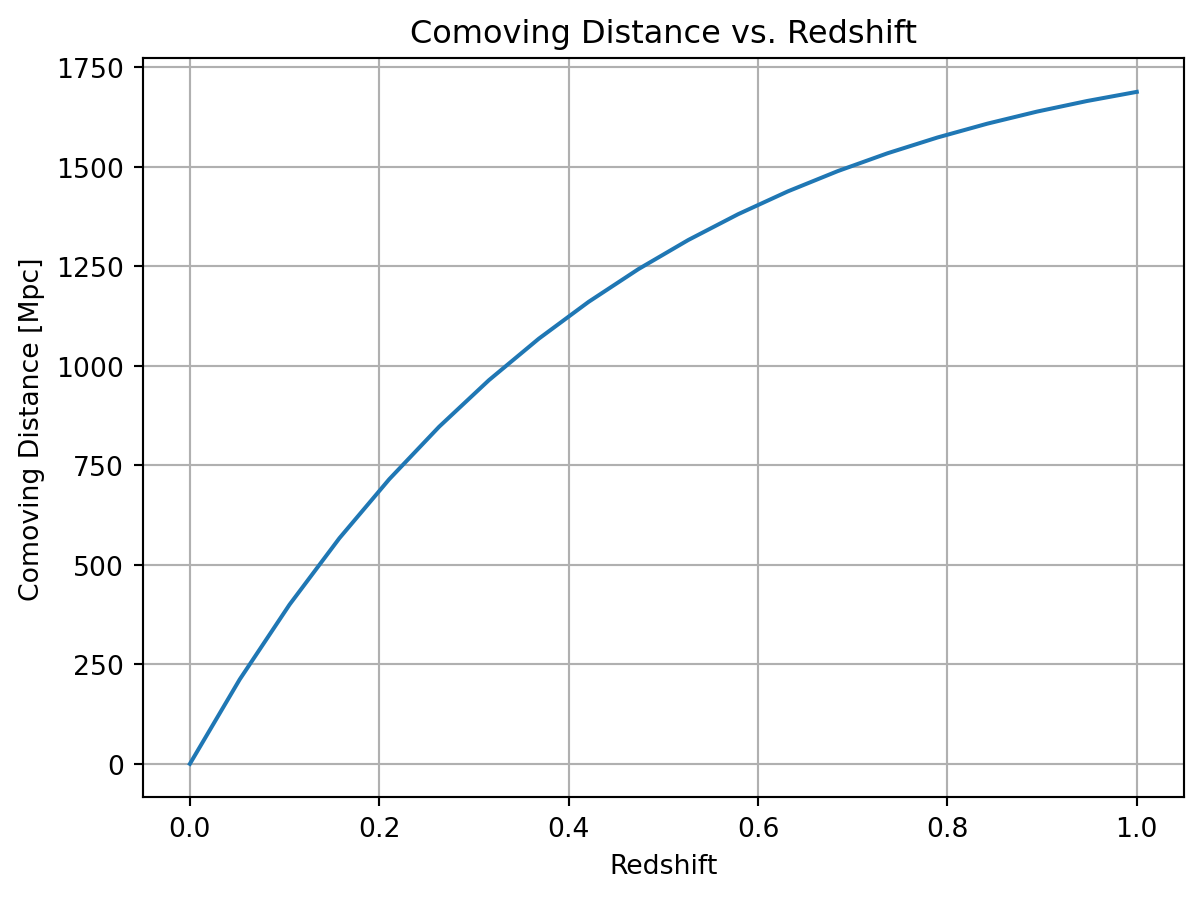
Plot the Results
You can plot the results using a plotting library such as matplotlib.
Code
plt.plot(z_array, dc_array)
plt.xlabel("Redshift")
plt.ylabel("Comoving Distance [Mpc]")
plt.title("Comoving Distance vs. Redshift")
plt.grid()
plt.show()